# キー行動の概要

## キー行動とは？ <a href="#what-is-key-behavior" id="what-is-key-behavior"></a>

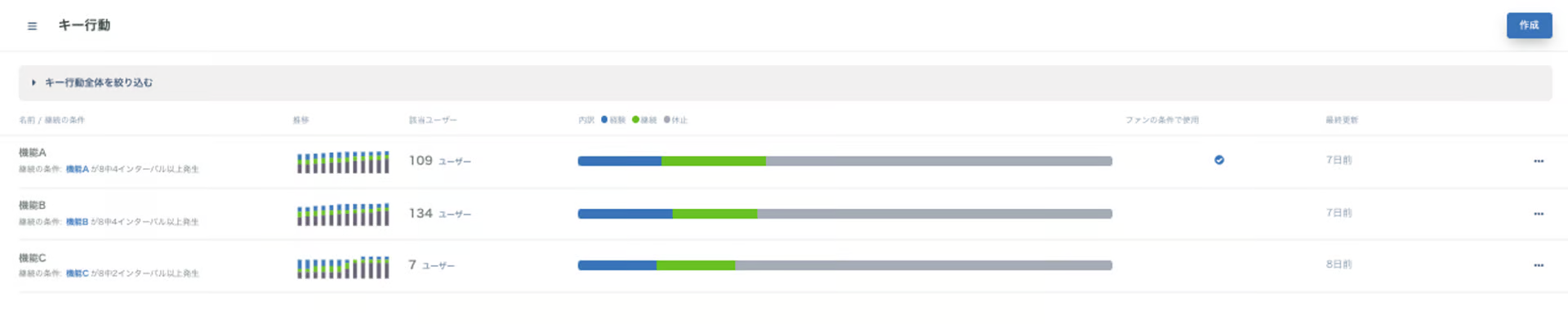
プロダクトの代表的な行動や機能を「経験」、「継続」、「頻度低下」、「休止」の4つの利用サイクルで可視化することで、ユーザーがどの程度その行動や機能を受け入れているかを把握することができます。設定前に、[デモプロジェクト](/getting-started/start-guide.md#demopurojekutotoha)でデータの可視化のイメージも確認できます。

またライフサイクルでは各フェーズとかけあわせてキー行動の利用サイクルが見え、ファンの条件として利用することもできます。

<figure><img src="/files/PUHKobk8hfevHp5XLGgU" alt=""><figcaption></figcaption></figure>

## 利用サイクルの定義 <a href="#usage-cycle-definition" id="usage-cycle-definition"></a>

4つの利用サイクルの定義は下記となります。

<table><thead><tr><th width="135">名前</th><th>定義</th></tr></thead><tbody><tr><td>経験</td><td>一度でも対象のキー行動をしたユーザー。</td></tr><tr><td>継続</td><td>キー行動のリテンションで設定したインターバルの条件に合致したユーザー。<br>デフォルトの場合は、8インターバル中4インターバルとなっています。<br>1インターバルが1週間の場合、8週間のうち4週間対象のキー行動をしたユーザーとなります。</td></tr><tr><td>頻度低下</td><td>一度「継続」になったがそこから継続の条件には合致せず頻度が頻度が低下したユーザー。</td></tr><tr><td>休止</td><td>「経験」、「継続」や「頻度低下」の利用サイクルに入った後に一定期間キー行動をしなかったユーザー。休止の条件は継続の条件に連動して変更されます。<br>デフォルトの場合は、8インターバル連続で発生がない場合となっています。<br>1インターバルが1週間の場合、8週間連続でキー行動をしなかったユーザーとなります。</td></tr></tbody></table>


---

# Agent Instructions: Querying This Documentation

If you need additional information that is not directly available in this page, you can query the documentation dynamically by asking a question.

Perform an HTTP GET request on the current page URL with the `ask` query parameter:

```
GET https://docs.wicle.io/visualizing-retention/key-behavior/overview.md?ask=<question>
```

The question should be specific, self-contained, and written in natural language.
The response will contain a direct answer to the question and relevant excerpts and sources from the documentation.

Use this mechanism when the answer is not explicitly present in the current page, you need clarification or additional context, or you want to retrieve related documentation sections.
